Serve a table
Open a table's order, send each round to the kitchen, and read the room while it cooks.
On this page
We’re at Quán Nướng Sài Gòn, the grill house where Tuấn Đỗ works his own floor. Hoa Nguyễn is seated at B03 - checked in as Take a reservation describes. This article runs the meal in BANA Sale: the first round, the ticket to the grill, the room while it waits, then the next round.
Before you start
- Signed in to BANA Sale at sale.bana.com.vn.
- The menu is already in the catalog - see Add your first product.
- A party at the table - checked in from a booking, or walk-ins at a free table - see Take a reservation.
During the meal
Take the order
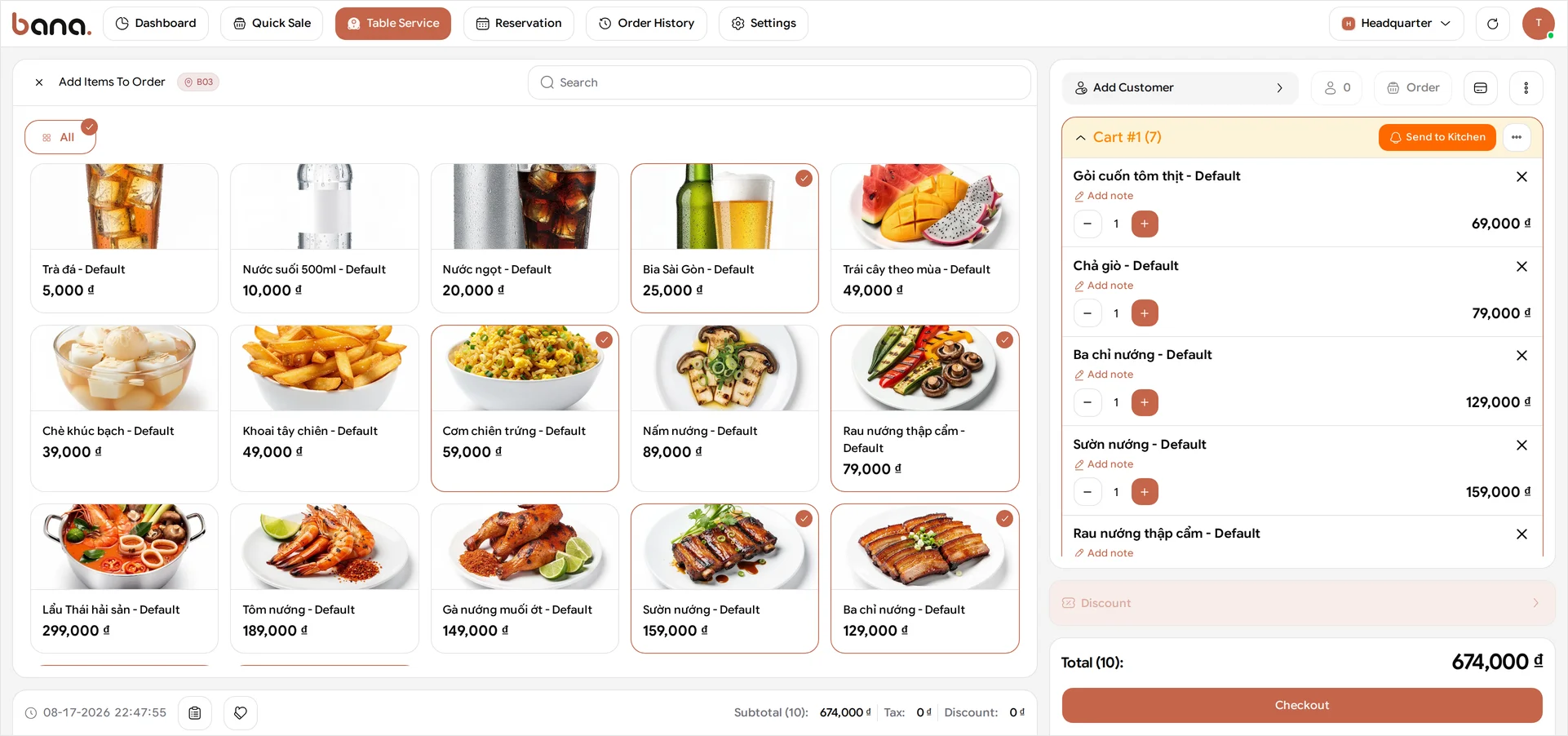
Open Table Service in the top bar, select B03, then select Go to Order on its card. That opens an order for this table and puts the menu on screen - the whole catalogue, narrowed with the category filter or the Search box. Every item you add goes onto the table’s bill.
Hoa’s table orders the way a table of four does: 1× Gỏi cuốn tôm thịt at 69,000 ₫ and 1× Chả giò at 79,000 ₫ to share, 1× Ba chỉ nướng at 129,000 ₫ and 1× Sườn nướng at 159,000 ₫ off the grill, 1× Rau nướng thập cẩm at 79,000 ₫ and 1× Cơm chiên trứng at 59,000 ₫ for the middle of the table, and 4× Bia Sài Gòn at 25,000 ₫ each - ten items, 674,000 ₫ for the first round. Tap a dish once per portion, or use the − and + on its line in the order panel; the ✕ on the line drops it again.
Then press Send to Kitchen. That is the step that actually tells the grill - items sitting in the panel unsent have been priced but nobody is cooking them. Once it’s sent, the round’s header swaps Send to Kitchen for Serve All Ready and each line grows a row of counters tracking it through the kitchen. Serve All Ready is on screen but isn’t wired up yet, so treat the header swap as your receipt that the ticket went, not as a button to press.
Every round needs sending. BANA treats each round as its own cart, so a later round of drinks is a new round and needs its own Send to Kitchen. You don’t have to start that round yourself - there’s no “new round” button to hunt for. Once a round is sent, the next item you add opens a fresh one automatically.
Sending is final for that round. Get the lines right before you send: afterwards the −, + and ✕ stop responding, the quantities freeze into plain
x1chips, and Reset Cart greys out with them. There is no way to pull a dish off a sent round from this screen, so a guest who changes their mind after the ticket has gone to the grill is a conversation, not a button.
Sent isn’t the same as Cooking. The table stays Occupied after you send. It only turns Cooking once the kitchen starts the items on its own screen, so the map is telling you what the grill is doing, not what you pressed.
Close the menu with the ✕ to go back to the map. The table reads Occupied, and its button reads More Order for the next round. Later rounds land on the same order, so add everything the table wants before you press Checkout.
Watch the room fill up
While the grill works, the map is the thing to watch. Table Service carries the same Card / Canvas switch, and mid-service is where the plan earns its keep. Each table shows how many of its seats are taken - 4/4 for Hoa’s - and a timer counting how long the party has been sitting, next to the colour for its status. One glance tells you which tables have just sat down and which have been lingering over the last of the beer.
Take the next round
Half an hour later the table wants more beer, and dessert all round because it’s a birthday. Open B03 again - its card now reads More Order - and add 2× Bia Sài Gòn and 4× Chè khúc bạch at 39,000 ₫ each.
The panel now shows both rounds, newest first. Cart #2 sits on top, still open and still editable, with its own Send to Kitchen waiting. Cart #1 has dropped below it and greyed out - its quantities are plain x1 and x2 chips you can’t nudge, and its header offers Serve All Ready instead. Rounds stack up like this all evening, so the order panel is where you read back what a table has had and when.
Now press Send to Kitchen on Cart #2. That round is 206,000 ₫ - two beers at 50,000 ₫ and four desserts at 156,000 ₫ - and it lands on the same order, taking the running total to 880,000 ₫ across sixteen items.
What the table statuses mean
BANA Sale has two table maps and they don’t use the same vocabulary, which is worth knowing before you go looking for a status that isn’t there. Each map colour-codes its own set, and the legend across the top of the map is the key - it names every status and counts the tables sitting in it.
Table Service - the service map, which follows the meal:
| Status | Vietnamese | What it means |
|---|---|---|
| Available | Còn trống | Free to seat |
| Occupied | Đang ăn | Guests seated, with an open bill |
| Cooking | Đang nấu | Seated, and the kitchen has started cooking their food |
| Clean | Dọn dẹp | Paid and empty, and still needs wiping |
Careful with Clean. It marks a table that needs cleaning, not one that has been cleaned. Done is the button you press once you’ve wiped it.
The Reservation map only cares whether a table is spoken for, and bookings carry their own set - see Take a reservation.
What’s next
- Settle the bill and clear the table - checkout, payment, the receipt, and the table going free.
- Look up an order - find the table’s bill again later.
Frequently asked questions
The guest wants a different table once they're sitting down.
Open the table's order and choose Move Table from the more menu - the order moves across with them, and the list only offers tables that are currently free. Merge Table sits in the same menu but isn't available yet, so two tables pushed together still bill separately for now; Split Order, also in that menu, is the one to reach for when a table wants separate bills - but use it before you check out, because checkout closes the order.
The guest changes their mind after the round has gone to the kitchen.
There is no way to pull a dish off a sent round from this screen: the quantity and remove controls stop responding the moment you press Send to Kitchen. Get the lines right before sending; after that it is a conversation with the kitchen, not a button.