Set up your floor plan
Build rooms and tables in the dashboard so bookings and orders have a real table to land on.
On this page
Cà Phê Sài Gòn sells across a counter, so to show table service we’re stepping next door to Quán Nướng Sài Gòn, a grill house where Tuấn Đỗ works his own floor. Before the first booking can be taken, the room has to exist in BANA: this article builds it in the dashboard. The evening itself - bookings, orders, the bill - runs in BANA Sale, starting with Take a reservation.
Before you start
- Tuấn is signed in to the dashboard at client.bana.com.vn.
- You know your room: how many floors, how many areas on each, and how many tables with how many seats in each area - the wizard asks exactly those three things.
In the dashboard
Build the floor plan
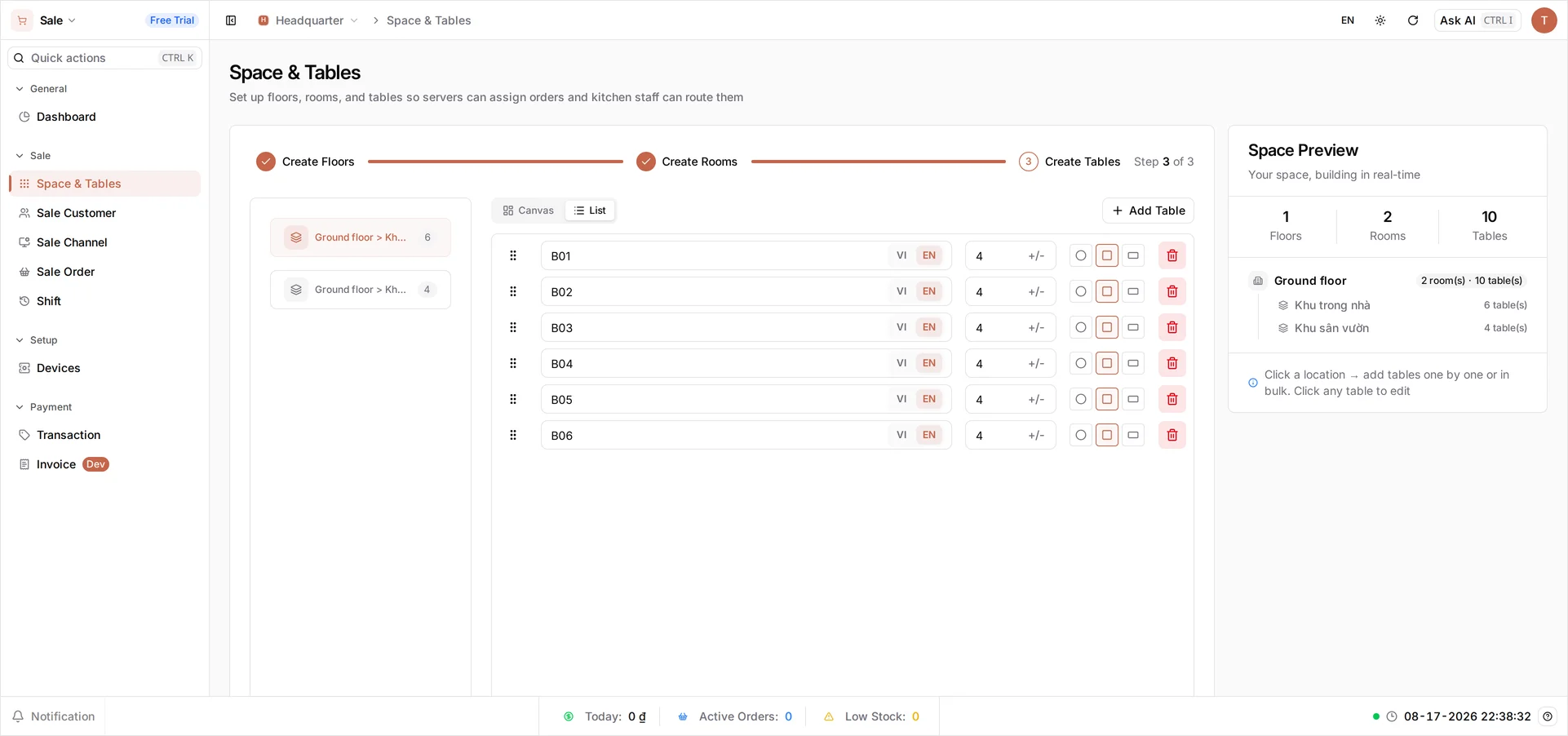
In the dashboard, open Sale → Space & Tables. The wizard asks three things in turn: how many floors, how many rooms each floor is divided into, and then the tables.
Quán Nướng Sài Gòn has one floor and two rooms - Khu trong nhà and Khu sân vườn. In Create Tables, pick a room and select Add Table. You don’t name tables one at a time: Table Name is a prefix and BANA numbers up from it, so a prefix of B0 and a Number of Tables of 6 gives you B01–B06.
For the indoor room Tuấn enters prefix B0, Number of Tables 6, Number of Seats 4, square - B01 to B06. For the garden he does it again with V0, 4 tables of 6 seats, round. Then Finish Setup.
One open room, no separate areas? Every floor carries at least one room - the room count can’t go below 1 - so leave it at 1 and give that room the name you’d use for the whole floor. It costs you nothing: the POS shows one room picker with one entry in it. Quán Nướng Sài Gòn goes to two only because the garden really is a separate area.
The prefix is a starting point, not a life sentence. Create Tables lists every table it made on one row each, and each row’s name, seat count and shape stay editable - so rename B04 to Cửa sổ, drop a two-seater to 2 seats, or press Add Table again in the same room for a batch with different seating. You can come back to Space & Tables later and do the same.
Name tables and rooms the way your staff already call them out loud: these names show on the POS map, on the booking, and on the order. Name both language tabs. Each name field has a VI and an EN tab, and they are stored separately: fill in only one and a till running in the other language falls back to the name BANA generated for you, so your “Khu sân vườn” shows up on the floor as “Default”.
Seat counts are not decoration. A booking takes its party size from the table’s seats, so a table set to 4 is always booked as four - and a party of six seated at an 8-top goes into the book as eight. Set seat counts to match the real furniture now and the reservation screen does the arithmetic for you later.
Arrange the room
Bulk-adding drops your tables in a plain row, which is fine for the wizard’s List but nothing like your actual room. Switch that panel to Canvas and you get the floor drawn to scale: drag a table and it snaps into line with its neighbours, and the handles on a selected table rotate and resize it. Zoom with the + and − underneath.
It’s worth ten minutes. This layout is the one your staff read all evening on the POS, so the closer it sits to the real room, the less time anyone spends hunting for B03.
What you created
Quán Nướng Sài Gòn now has one floor, two rooms and ten tables, ready to take bookings and orders:
| Room | Tables | Seats | Shape |
|---|---|---|---|
| Khu trong nhà | B01–B06 | 4 | Square |
| Khu sân vườn | V01–V04 | 6 | Round |
What’s next
- Take a reservation - the first booking in BANA Sale, on this very plan.
- Configure POS settings - reservation hold time and auto-cancelling late bookings.
Frequently asked questions
Can I name tables individually?
Yes. The prefix is only a starting point: Create Tables lists every table on its own row, and each row's name, seat count and shape stay editable, both now and whenever you come back to Space & Tables.
My place is one open room. Do I have to create rooms?
No. Every floor carries at least one room, so leave the count at 1 and give that room the name you'd use for the whole floor. On the POS that is one room picker with one entry in it.