Sell an add-on or FBT at the till
A free extra lands by itself, a suggested pairing takes one tap: how both show up in BANA Sale and how the cart records them.
On this page
The owner has given Bạc xỉu one free extra and one suggested pairing in Set up add-ons and FBT - FBT is BANA’s label for frequently bought together. This article is the cashier’s half: how the two show up in BANA Sale, which one lands on the order by itself, which one takes a tap, and how the cart records them.
Before you start
- Signed in to BANA Sale at sale.bana.com.vn.
Bạc xỉualready carries an Addon row and an FBT row in its bundle dialog - the owner’s job, see Set up add-ons and FBT.
At the till
See the offer at the till
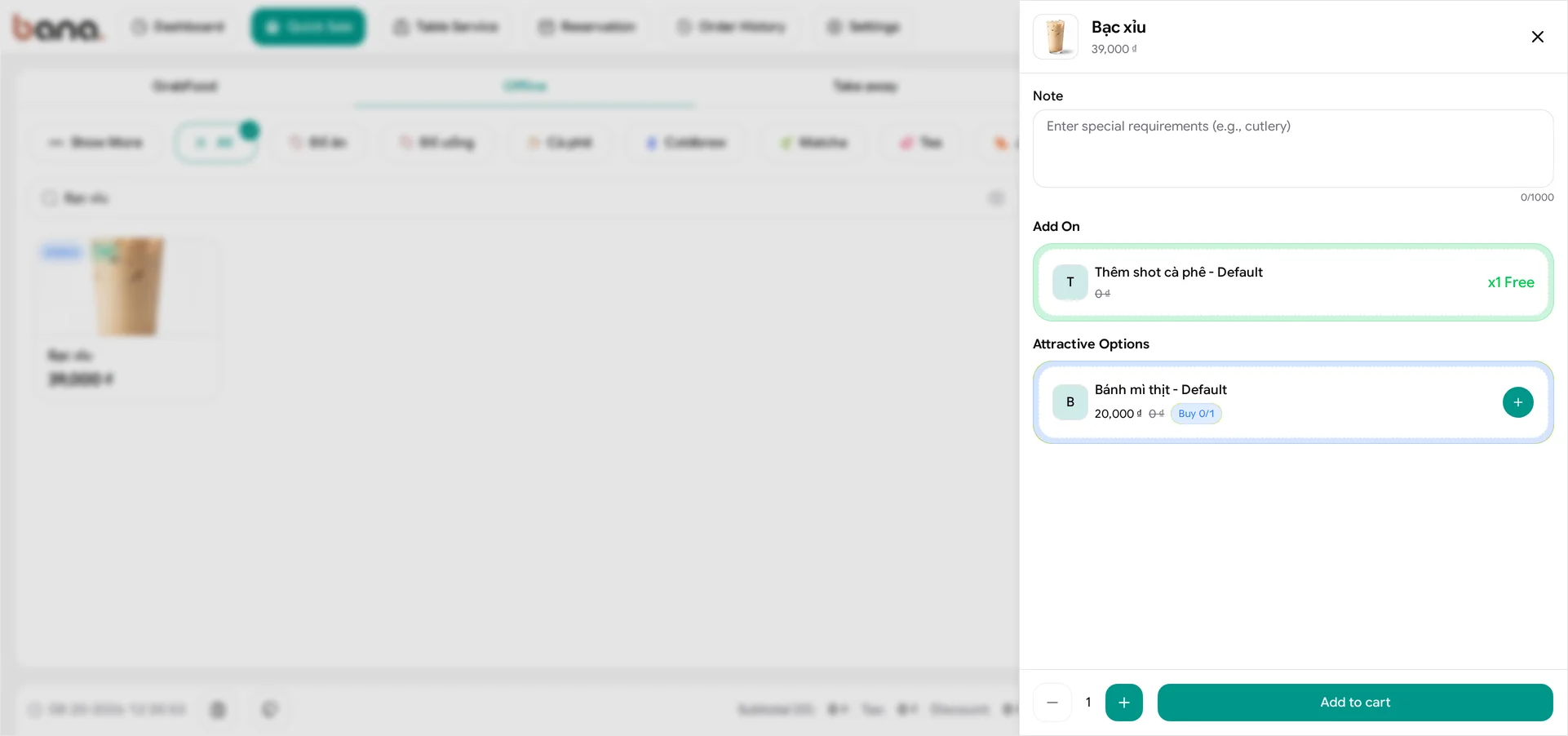
Open BANA Sale at sale.bana.com.vn and tap Bạc xỉu on the product grid. Its card already carries two small badges - Addon and FBT - and the sheet that opens shows what they are:
- Add On is applied, not offered.
Thêm shot cà phêsits on a green row with its price struck through and x1 Free at the end. The cashier does nothing; the customer gets it. - Attractive Options is the FBT.
Bánh mì thịtshows 20,000 đ with a struck-through0 đbeside it and a Buy 0/1 chip - 0 taken, 1 the most this line allows. It only joins the order when the cashier taps the round +.
That is the whole difference in one screen: the free extra is already there, the paid suggestion is one tap away and can be ignored.
Verify in the cart
Tap the + on the pairing, then Add to cart, and open the line in the order panel.
The cart header counts what the customer chose - Cart #1 (1) - while the footer counts every part. The drink rings up at 39,000 đ with a FBT 1/1 chip on it, and the two extras hang underneath as their own indented rows: Thêm shot cà phê with a blue Addon badge at 0 đ, and Bánh mì thịt with a teal FBT badge at 20,000 đ. One line the customer chose, one extra the setup handed over and one the cashier accepted - Total (3), 59,000 đ.
An FBT is a real item, so stock still applies. If the suggested item has no stock and cannot oversell, the till refuses the whole line - Insufficient stock for product variant. A free add-on is no different: it reserves its item like any sale. That applies to the attached items, not just the drink: one out-of-stock giveaway blocks the whole line. Switch Allow Oversell on for made-to-order items - see Enable Allow Oversell - or keep them stocked.
What’s next
- Make your first sale - one complete sale from start to finish.
- Set up add-ons and FBT - the owner’s side of these two items.
- Enable Allow Oversell - so a made-to-order item never blocks a line.
Frequently asked questions
The till refuses the whole line even though the drink is in stock.
An attached item is a real item: a free extra or a suggested pairing with no stock and no Allow Oversell blocks the entire line. Ask the owner to switch Allow Oversell on for made-to-order items, or restock them.
The customer does not want the suggestion.
Leave the + alone. The suggested pairing only joins the order when you tap it; the free extra lands on its own and costs nothing.